<?xml version="1.0" encoding="utf-8"?><feed xmlns="http://www.w3.org/2005/Atom" ><generator uri="https://jekyllrb.com/" version="3.10.0">Jekyll</generator><link href="https://ericluap.github.io/feed.xml" rel="self" type="application/atom+xml" /><link href="https://ericluap.github.io/" rel="alternate" type="text/html" /><updated>2026-03-30T02:33:42+00:00</updated><id>https://ericluap.github.io/feed.xml</id><title type="html">Eric Paul</title><subtitle>Eric is a PhD student at UIUC. His research focuses on interactive theorem proving.</subtitle><entry><title type="html">What’s a fibration?</title><link href="https://ericluap.github.io/types/2026/03/29/fibration.html" rel="alternate" type="text/html" title="What’s a fibration?" /><published>2026-03-29T00:00:00+00:00</published><updated>2026-03-29T00:00:00+00:00</updated><id>https://ericluap.github.io/types/2026/03/29/fibration</id><content type="html" xml:base="https://ericluap.github.io/types/2026/03/29/fibration.html"><![CDATA[<p>Let’s say we have a type X with some elements.</p>

<p><img src="/assets/images/fibration/fibration_type_X.png" alt="" class="center-image" width="300" /></p>

<p>We can imagine splitting up all the elements of X into separate groups.</p>

<p><img src="/assets/images/fibration/fibration_mainFib_typeX.png" alt="Image of a circle labelled &quot;X&quot; with some points inside it" class="center-image" width="300" /></p>

<p>This is a fibration. We call each imagined grouping a fiber. So this fibration of X has three fibers.</p>

<p>We can have other fibrations of X:</p>

<div style="display:flex; gap:10px; flex-wrap: wrap">
  <img src="/assets/images/fibration/fibration_sideFib1_typeX.png" width="300" height="300" />
  <img src="/assets/images/fibration/fibration_sideFib2_typeX.png" width="300" height="300" />
  </div>

<p>Both of these fibrations of X have three fibers.</p>

<h2 id="describing-fibrations">Describing fibrations</h2>

<p>Now we would like to be able to describe a fibration nicely. We begin by giving a name to each fiber. We name ours <code class="language-plaintext highlighter-rouge">blue</code>, <code class="language-plaintext highlighter-rouge">orange</code>, and <code class="language-plaintext highlighter-rouge">green</code>.</p>

<p><img src="/assets/images/fibration/fibration_namedFib_typeX.png" alt="Image of name written next to each fiber" class="center-image" width="300" /></p>

<p>We can now create a function from X to {<code class="language-plaintext highlighter-rouge">blue</code>, <code class="language-plaintext highlighter-rouge">orange</code>, <code class="language-plaintext highlighter-rouge">green</code>} that assigns to each element of X the name of the fiber that it is in.</p>

<p><img src="/assets/images/fibration/fibration_funcEnc_typeX.png" alt="Image of function assigning name to each element" /></p>

<p>Great! This function nicely captures our fibration of X. A different function would encode a different fibration of X.</p>

<p>There is another way we could describe a fibration of X. We can create a function that, given the name of a fiber, returns the fiber.</p>

<p><img src="/assets/images/fibration/fibration_indexedEnc_typeX.png" alt="Image of function assigning fiber to each name" /></p>

<p>This function also captures our fibration of X. A different output for any given name would encode a different fibration.</p>

<p>Let’s look at a specific example. We have the type <code class="language-plaintext highlighter-rouge">Bool × Bool</code> of pairs of booleans:</p>

<p><img src="/assets/images/fibration/fibration_boolPair.png" alt="Image of circle with points labelled by pairs of booleans" class="center-image" width="300" /></p>

<p>We can imagine grouping together elements whose first booleans are equal.</p>

<p><img src="/assets/images/fibration/fibration_fib_boolPair.png" alt="Image grouping together pairs of booleans with same first component" class="center-image" width="300" /></p>

<p>This is a fibration on <code class="language-plaintext highlighter-rouge">Bool × Bool</code> that has two fibers. And here are the two different ways to encode that fibration.</p>

<p>As a function from elements of <code class="language-plaintext highlighter-rouge">Bool × Bool</code> to the names of their fibers they are in:</p>

<p><img src="/assets/images/fibration/fibration_funcEnc_boolPair.png" alt="Image showing function mapping each grouping of pairs of booleans to their first component" /></p>

<p>And as a function from the names of the fibers to the entire fibers themselves:</p>

<p><img src="/assets/images/fibration/fibration_indexedEnc_boolPair.png" alt="Image showing function mapping boolean to pairs of booleans with that boolean as first component" /></p>
<h2 id="going-backwards">Going backwards</h2>

<p>Let’s say we are given some random function <code class="language-plaintext highlighter-rouge">p</code> from a type X to some other type Y.</p>

<p><img src="/assets/images/fibration/fibration_randFunc.png" alt="Image showing function from a circle with points labelled &quot;X&quot; to another such one labelled &quot;Y&quot;" /></p>

<p>We can imagine that this function <code class="language-plaintext highlighter-rouge">p : X → Y</code> is actually encoding a fibration. We do this by treating Y as the type of names of each fiber. Then we get a fibration on X by imagining grouping together elements X that are given the same name by <code class="language-plaintext highlighter-rouge">p</code>.</p>

<p><img src="/assets/images/fibration/fibration_funcEnc_randFunc.png" alt="Image circling points in X that map to the same point in Y" /></p>

<p>(We have some unused names in Y, but that’s ok for us.)</p>

<p>Now let’s say we are given a random function <code class="language-plaintext highlighter-rouge">f</code> from a type <code class="language-plaintext highlighter-rouge">Y</code> to a collection of types <code class="language-plaintext highlighter-rouge">Type</code>.</p>

<p><img src="/assets/images/fibration/fibration_randIndex.png" alt="Image showing function from circle with points labelled &quot;Y&quot; to another circle with points labelled &quot;Types&quot;" /></p>

<p>We can imagine that this function <code class="language-plaintext highlighter-rouge">f : Y → Type</code> is encoding a fibration. We do this by treating Y as the type of names of each fiber. And then what <code class="language-plaintext highlighter-rouge">f</code> maps each name to we will treat as being the entire fiber associated with that name.</p>

<p><img src="/assets/images/fibration/fibration_indexedEnc_randIndex.png" alt="Image highlighting the points in the image of the function from Y to Types" /></p>

<p>Now the type that actually has the fibration that this function <code class="language-plaintext highlighter-rouge">f : Y → Type</code> is encoding is built by combining all the fibers together.</p>

<p><img src="/assets/images/fibration/fibration_combine_randIndex.png" alt="Image showing turning the separate fibers into a single type" /></p>

<h2 id="moving-between">Moving between</h2>

<p>We can now take a random function, view it as encoding a fibration, switch to the other encoding of the fibration, and get back out a new function.</p>

<p>Let’s go through an example. We begin with a function <code class="language-plaintext highlighter-rouge">p : Bool × Bool → Bool</code> from pairs of booleans to a single boolean.</p>

<p><img src="/assets/images/fibration/fibration_randFunc_boolPair.png" alt="Image showing a function from circle containing pairs of booleans to circle containing booleans" /></p>

<p>From this function <code class="language-plaintext highlighter-rouge">p : Bool × Bool → Bool</code>, we get this fibration on <code class="language-plaintext highlighter-rouge">Bool × Bool</code>.</p>

<p><img src="/assets/images/fibration/fibration_randFunc_boolPair_fib.png" alt="Image showing grouping of points in the circle containing pairs of booleans" class="center-image" width="300" /></p>

<p>Finally, we write down the other encoding of this fibration to get a function <code class="language-plaintext highlighter-rouge">S : Bool → Type</code>.</p>

<p><img src="/assets/images/fibration/fibration_randFunc_boolPair_indexEnc.png" alt="Image showing function from booleans to Types mapping each boolean to its associated fiber" /></p>

<p>So we have turned a function <code class="language-plaintext highlighter-rouge">p : Bool × Bool → Bool</code> into a collection of types indexed by <code class="language-plaintext highlighter-rouge">Bool</code> (i.e. our function <code class="language-plaintext highlighter-rouge">S : Bool → Type</code>).</p>

<p>And that’s basically what fibrations are up to (ignoring all that path business).</p>]]></content><author><name></name></author><category term="types" /><summary type="html"><![CDATA[Let’s say we have a type X with some elements.]]></summary></entry><entry><title type="html">Some names of Lean tactics don’t work</title><link href="https://ericluap.github.io/lean/2026/01/14/names.html" rel="alternate" type="text/html" title="Some names of Lean tactics don’t work" /><published>2026-01-14T00:00:00+00:00</published><updated>2026-01-14T00:00:00+00:00</updated><id>https://ericluap.github.io/lean/2026/01/14/names</id><content type="html" xml:base="https://ericluap.github.io/lean/2026/01/14/names.html"><![CDATA[<p>Take a look at this example:</p>
<div class="language-lean highlighter-rouge"><div class="highlight"><pre class="highlight"><code><span class="n">syntax</span> <span class="s">"test~"</span> : <span class="n">tactic</span>

<span class="k">example</span> : <span class="n">True</span> := <span class="k">by</span>
  <span class="n">test</span><span class="o">~</span><span class="cd"> -- error here!</span>
</code></pre></div></div>
<p>We added a new parsing rule that says the token <code class="language-plaintext highlighter-rouge">"test~"</code> is a tactic. But we get the error <code class="language-plaintext highlighter-rouge">unknown tactic</code> underlining <code class="language-plaintext highlighter-rouge">test</code>. Why did this fail?</p>

<p>If we remove the tilde, then it does work. So we might guess that perhaps we can’t have tildes in names of things, but it does work basically everywhere else:</p>
<div class="language-lean highlighter-rouge"><div class="highlight"><pre class="highlight"><code><span class="n">syntax</span> <span class="s">"test~"</span> : <span class="n">command</span>

<span class="n">test</span><span class="o">~</span><span class="cd"> -- no parsing error here</span>
</code></pre></div></div>
<p>(This example adds a new parsing rule that says the token <code class="language-plaintext highlighter-rouge">"test~"</code> is a command. It then parses the following <code class="language-plaintext highlighter-rouge">"test~"</code> successfully as a command.)</p>

<p>So for some reason, our tilde is only failing in our tactic example. What’s going on?</p>

<h2 id="tactics-are-different">Tactics are different</h2>
<p>The names of tactics are indeed being registered differently inside of the parser. Here’s another way we can see this difference:</p>
<div class="language-lean highlighter-rouge"><div class="highlight"><pre class="highlight"><code><span class="n">syntax</span> <span class="s">"name"</span> : <span class="n">tactic</span>

<span class="k">def</span> <span class="n">name</span> := <span class="mi">3</span><span class="cd"> -- no parsing error here</span>
</code></pre></div></div>
<p>Here we’ve registered <code class="language-plaintext highlighter-rouge">name</code> as the name of a tactic and we were also able to make a variable <code class="language-plaintext highlighter-rouge">name</code> as well.</p>

<p>But if we do this with a term instead of a tactic, it fails:</p>
<div class="language-lean highlighter-rouge"><div class="highlight"><pre class="highlight"><code><span class="n">syntax</span> <span class="s">"name"</span> : <span class="n">term</span>

<span class="k">def</span> <span class="n">name</span> := <span class="mi">3</span><span class="cd"> -- error here!</span>
</code></pre></div></div>
<p>We get an error on the definition saying that it expected an identifier but got <code class="language-plaintext highlighter-rouge">name</code>.</p>

<p>This is in fact the core difference between tactic and other categories that caused our original error: the names of tactics do not become reserved keywords.</p>

<h2 id="how-do-reserved-keywords-work">How do reserved keywords work?</h2>
<p>The parser stores a set of reserved keywords. Every time we add a new syntax rule in a normal category, any words used in it become reserved keywords.</p>

<p>So when we wrote</p>
<div class="language-lean highlighter-rouge"><div class="highlight"><pre class="highlight"><code><span class="n">syntax</span> <span class="s">"test~"</span> : <span class="n">command</span>

<span class="n">test</span><span class="o">~</span><span class="cd"> -- no parsing error here</span>
</code></pre></div></div>
<p>a new reserved keyword <code class="language-plaintext highlighter-rouge">"test~"</code> was added to the parser.  The parser then looks for the next token it needs to parse. The next token function looks for the longest identifier <strong>or</strong> reserved keyword it can find. The longest identifier is <code class="language-plaintext highlighter-rouge">"test"</code> because <code class="language-plaintext highlighter-rouge">"~"</code> is not a valid symbol within an identifier. The longest reserved keyword is <code class="language-plaintext highlighter-rouge">"test~"</code> and since this is longer than the longest identifier, the next token is <code class="language-plaintext highlighter-rouge">"test~"</code>. Then because we added a syntax rule that says the token <code class="language-plaintext highlighter-rouge">"test~"</code> is a command, it is successfully parsed as a command.</p>

<p>But the tactic category is special and does not make the first word used in any of its rules a reserved keyword. Thus, when we wrote</p>
<div class="language-lean highlighter-rouge"><div class="highlight"><pre class="highlight"><code><span class="n">syntax</span> <span class="s">"test~"</span> : <span class="n">tactic</span>

<span class="k">example</span> : <span class="n">True</span> := <span class="k">by</span>
  <span class="n">test</span><span class="o">~</span><span class="cd"> -- error here!</span>
</code></pre></div></div>
<p>we did <strong>not</strong> add a new reserved keyword. Once again, the parser then looks for the next token it needs to parse by finding the longest identifier or reserved keyword. The longest identifier is again <code class="language-plaintext highlighter-rouge">"test"</code> since <code class="language-plaintext highlighter-rouge">"~"</code> cannot be in an identifier. But now there is no longer any reserved keyword applicable and so the next token is <code class="language-plaintext highlighter-rouge">"test"</code>. Since there is no parsing rule that says <code class="language-plaintext highlighter-rouge">"test"</code> is a valid tactic, we get an error saying that <code class="language-plaintext highlighter-rouge">"test"</code> is an unknown tactic.</p>

<p>So to recap, there are characters like <code class="language-plaintext highlighter-rouge">"~"</code> that can appear in keywords but not identifiers. Since the tactic category does not make the first word of any of its parsing rules a reserved keyword, if the first word contains a character that can’t appear in an identifier, it won’t be found by the next token parsing function and so will fail to be a valid tactic name.</p>

<p>And that’s our answer!</p>

<h2 id="some-extra-details">Some extra details</h2>
<p>We can actually tell Lean to not reserve a keyword explicitly. For example, in the command category, the following does reserve a keyword:</p>
<div class="language-lean highlighter-rouge"><div class="highlight"><pre class="highlight"><code><span class="n">syntax</span> <span class="s">"test"</span> : <span class="n">command</span>

<span class="k">def</span> <span class="n">test</span> := <span class="mi">3</span><span class="cd"> -- error here!</span>
</code></pre></div></div>
<p>and so we get an error in the definition as the token <code class="language-plaintext highlighter-rouge">test</code> is now a reserved keyword instead of identifier.</p>

<p>If we add an ampersand before the text, it tells Lean to not reserve a keyword:</p>
<div class="language-lean highlighter-rouge"><div class="highlight"><pre class="highlight"><code><span class="n">syntax</span> <span class="o">&amp;</span><span class="s">"test"</span> : <span class="n">command</span>

<span class="k">def</span> <span class="n">test</span> := <span class="mi">3</span><span class="cd"> -- no error here</span>
</code></pre></div></div>
<p>and so we do not get an error as <code class="language-plaintext highlighter-rouge">test</code> is not a reserved keyword.</p>

<p>The tactic category just automatically adds that ampersand to the first word in the syntax rule for us. But on top of automatically adding the ampersand, the tactic category has another special feature!</p>

<p>Take a look at this example:</p>
<div class="language-lean highlighter-rouge"><div class="highlight"><pre class="highlight"><code><span class="n">syntax</span> <span class="o">&amp;</span><span class="s">"test"</span> : <span class="n">command</span>

<span class="n">test</span><span class="cd"> -- error here!</span>
</code></pre></div></div>
<p>We are saying that <code class="language-plaintext highlighter-rouge">"test"</code> is a command and the ampersand is telling Lean not to make it a reserved keyword. We then get an error on <code class="language-plaintext highlighter-rouge">test</code> saying <code class="language-plaintext highlighter-rouge">unexpected identifer; expected command</code>. What went wrong here?</p>

<p>Well when we write the normal line <code class="language-plaintext highlighter-rouge">syntax "test" : command</code>, it tells Lean that if the next token is the <strong>keyword</strong> <code class="language-plaintext highlighter-rouge">"test"</code>, then it is a command <strong>and</strong> that <code class="language-plaintext highlighter-rouge">"test"</code> is now a reserved keyword. When we add an ampersand, it is no longer a reserved keyword, but the parsing rule still only triggers when the next token is the <strong>keyword</strong> <code class="language-plaintext highlighter-rouge">"test"</code>, not the <strong>identifier</strong> <code class="language-plaintext highlighter-rouge">"test"</code>.</p>

<p>So when the parser reaches the input <code class="language-plaintext highlighter-rouge">test</code> in the example, the next token function is called. As before, it tries to find the longest identifier or the longest reserved keyword. The longest identifier is <code class="language-plaintext highlighter-rouge">"test"</code> and there is no longest reserved keyword due to the ampersand. So the next token is the identifier <code class="language-plaintext highlighter-rouge">"test"</code> and not the keyword <code class="language-plaintext highlighter-rouge">"test"</code>. Thus, our parsing rule is never triggered as it expected the keyword <code class="language-plaintext highlighter-rouge">"test"</code> and we get an error.</p>

<p>But this error doesn’t occur in the tactic category! The tactic category automatically adds ampersands to the first word in the parsing rule and so we’d expect the parsing rule to similarly never trigger and so see an error. However, on top of adding ampersands automatically, the tactic category also tells the parser to attempt the parsing rule on identifiers as well as keywords.</p>

<p>Knowing this, let’s walk through what happens in this successful example:</p>
<div class="language-lean highlighter-rouge"><div class="highlight"><pre class="highlight"><code><span class="n">syntax</span> <span class="s">"test"</span> : <span class="n">tactic</span>

<span class="k">example</span> : <span class="n">True</span> := <span class="k">by</span>
  <span class="n">test</span><span class="cd"> -- no parsing error here</span>
</code></pre></div></div>
<p>When the parser reaches <code class="language-plaintext highlighter-rouge">test</code>, it calls the next token function. The next token function tries to find the longest identifier or reserved keyword. Since we are in the tactic category, our new parsing rule did not make <code class="language-plaintext highlighter-rouge">"test"</code> a reserved keyword. Thus, the next token function says that the next token is the identifier <code class="language-plaintext highlighter-rouge">"test"</code>. Now our added parsing rule only applies to the keyword <code class="language-plaintext highlighter-rouge">"test"</code>, but since we are in the tactic category, parsing rules that apply to the keyword <code class="language-plaintext highlighter-rouge">"test"</code> are also attempted for the identifier <code class="language-plaintext highlighter-rouge">"test"</code>. So our added parsing rule is run and it says that <code class="language-plaintext highlighter-rouge">"test"</code> is a tactic. So we succeed in parsing.</p>

<p>Lean calls this feature the <em>leading identifier behavior</em>.</p>
<ul>
  <li>Having <strong>default</strong> leading identifier behavior means that if the next token is an identifier, only parsing functions for identifiers are tried.</li>
  <li>Having <strong>symbol</strong> leading identifier behavior means that if the next token is an identifier, then parsing functions for the corresponding keyword are not only tried, but also prioritized over any identifier parsing functions.</li>
  <li>Having <strong>both</strong> leading identifier behavior means that if the next token is an identifier, then parsing functions for the corresponding keyword are tried and are on equal footing with identifier parsing functions.</li>
</ul>

<p>And any category whose leading identifier behavior is not default, also gets the ampersands automatically inserted for the first word in any of its parsing rules. So the complete and short description of what makes the tactic category different from other categories is that its leading identifier behavior is <code class="language-plaintext highlighter-rouge">both</code> instead of <code class="language-plaintext highlighter-rouge">default</code>.</p>]]></content><author><name></name></author><category term="lean" /><summary type="html"><![CDATA[Take a look at this example: ```lean syntax “test~” : tactic]]></summary></entry><entry><title type="html">How Lean tracks your definitions</title><link href="https://ericluap.github.io/lean/2025/12/08/constants.html" rel="alternate" type="text/html" title="How Lean tracks your definitions" /><published>2025-12-08T00:00:00+00:00</published><updated>2025-12-08T00:00:00+00:00</updated><id>https://ericluap.github.io/lean/2025/12/08/constants</id><content type="html" xml:base="https://ericluap.github.io/lean/2025/12/08/constants.html"><![CDATA[<p>The big idea is that Lean has a dictionary that maps names of previously defined constants to their definitions. When it encounters a constant, it looks up what the constant means inside of this dictionary. Very reasonable.</p>

<p>Here’s an example of it working:</p>
<div class="language-lean highlighter-rouge"><div class="highlight"><pre class="highlight"><code><span class="k">import</span> <span class="n">Lean</span>
<span class="k">open</span> <span class="n">Lean</span>

<span class="k">def</span> <span class="n">test</span> := <span class="s">"hi"</span>

<span class="n">run_meta</span>
  <span class="n">let</span> <span class="n">env</span> : <span class="n">Environment</span> <span class="err">←</span> <span class="n">getEnv</span>
  
  <span class="n">let</span> <span class="n">info</span> := <span class="n">env</span><span class="o">.</span><span class="n">find</span><span class="err">?</span> <span class="o">``</span><span class="n">test</span> <span class="o">|&gt;.</span><span class="n">get</span><span class="o">!</span>
  <span class="n">Lean</span><span class="o">.</span><span class="n">logInfo</span> <span class="n">m</span><span class="o">!</span><span class="s">"{info.type}"</span>
</code></pre></div></div>
<p>We define a new constant <code class="language-plaintext highlighter-rouge">test</code> which Lean stores in its dictionary. Then we get the environment (the environment has our dictionary), look up the name <code class="language-plaintext highlighter-rouge">test</code> inside of the environment dictionary, and print some of the information we get back. Great.</p>

<p>Now here’s a strange situation where things don’t work:</p>
<div class="language-lean highlighter-rouge"><div class="highlight"><pre class="highlight"><code><span class="k">import</span> <span class="n">Lean</span>
<span class="k">open</span> <span class="n">Lean</span>

<span class="k">def</span> <span class="n">test</span> := <span class="s">"hi"</span>

<span class="n">run_meta</span>
  <span class="n">let</span> <span class="n">env</span> : <span class="n">Environment</span> <span class="err">←</span> <span class="n">getEnv</span>
  <span class="n">let</span> <span class="n">kernelEnv</span> : <span class="n">Kernel</span><span class="o">.</span><span class="n">Environment</span> := <span class="n">env</span><span class="o">.</span><span class="n">toKernelEnv</span>
  <span class="n">let</span> <span class="n">env</span> : <span class="n">Environment</span> := <span class="n">Environment</span><span class="o">.</span><span class="n">ofKernelEnv</span> <span class="n">kernelEnv</span>

  <span class="n">let</span> <span class="n">info</span> := <span class="n">env</span><span class="o">.</span><span class="n">find</span><span class="err">?</span> <span class="o">``</span><span class="n">test</span> <span class="o">|&gt;.</span><span class="n">get</span><span class="o">!</span>
  <span class="n">Lean</span><span class="o">.</span><span class="n">logInfo</span> <span class="n">m</span><span class="o">!</span><span class="s">"{info.type}"</span>
</code></pre></div></div>
<p>Here it fails to find the information about <code class="language-plaintext highlighter-rouge">test</code>. That is not ideal. But ok we’ve added some weird stuff at the start. What’s going on?</p>

<h2 id="the-two-environments">The two environments</h2>
<p>We begin by getting the environment <code class="language-plaintext highlighter-rouge">env</code> which has type <code class="language-plaintext highlighter-rouge">Environment</code>. We then convert it into <code class="language-plaintext highlighter-rouge">kernelEnv</code> which has type <code class="language-plaintext highlighter-rouge">Kernel.Environment</code>. Lastly, we convert it into <code class="language-plaintext highlighter-rouge">env</code> which again has type <code class="language-plaintext highlighter-rouge">Environment</code>.</p>

<p>The type <code class="language-plaintext highlighter-rouge">Kernel.Environment</code> is the final actual environment that Lean produces. However, Lean doesn’t actually process each of our definitions one after another: it tries to process them asynchronously. And that’s where <code class="language-plaintext highlighter-rouge">Environment</code> comes into play. The <code class="language-plaintext highlighter-rouge">Environment</code> tracks all these asynchronous things happening and builds up <code class="language-plaintext highlighter-rouge">Kernel.Environment</code> as things are completed.</p>

<p>When we convert <code class="language-plaintext highlighter-rouge">env</code> into <code class="language-plaintext highlighter-rouge">kernelEnv</code>, it tells Lean to wait for all the asynchronous things to finish so that we can have a <code class="language-plaintext highlighter-rouge">Kernel.Environment</code> representing all the constants that have been defined so far. Then when we convert <code class="language-plaintext highlighter-rouge">kernelEnv</code> back into <code class="language-plaintext highlighter-rouge">env</code>, it just sets all the extra asynchronous tracking stuff to be empty since nothing asynchronous is going on.</p>

<p>So why would this conversion back and forth mean we can’t find our defined constant <code class="language-plaintext highlighter-rouge">test</code> anymore? One might wonder if perhaps our code made Lean forget about all the constants. But the following code does work:</p>
<div class="language-lean highlighter-rouge"><div class="highlight"><pre class="highlight"><code><span class="k">import</span> <span class="n">Lean</span>
<span class="k">open</span> <span class="n">Lean</span>

<span class="n">run_meta</span>
  <span class="n">let</span> <span class="n">env</span> <span class="err">←</span> <span class="n">getEnv</span>
  <span class="n">let</span> <span class="n">kernelEnv</span> := <span class="n">env</span><span class="o">.</span><span class="n">toKernelEnv</span>
  <span class="n">let</span> <span class="n">env</span> := <span class="n">Environment</span><span class="o">.</span><span class="n">ofKernelEnv</span> <span class="n">kernelEnv</span>

  <span class="n">let</span> <span class="n">info</span> := <span class="n">env</span><span class="o">.</span><span class="n">find</span><span class="err">?</span> <span class="o">``</span><span class="n">String</span> <span class="o">|&gt;.</span><span class="n">get</span><span class="o">!</span>
  <span class="n">Lean</span><span class="o">.</span><span class="n">logInfo</span> <span class="n">m</span><span class="o">!</span><span class="s">"{info.type}"</span>
</code></pre></div></div>
<p>Here we just tried to find the information about the definition of <code class="language-plaintext highlighter-rouge">String</code> and it succeeds. So our messing with the environment is forgetting <code class="language-plaintext highlighter-rouge">test</code> but not <code class="language-plaintext highlighter-rouge">String</code>?</p>
<h2 id="the-staged-map">The staged map</h2>
<p>It turns out that Lean doesn’t actually store all the constants we’ve defined in a single dictionary. It splits things into two dictionaries! The first dictionary stores all the constants defined in stuff that we’re importing while the second dictionary stores all the constants we’re defining locally. And so <code class="language-plaintext highlighter-rouge">String</code> is in the first dictionary and <code class="language-plaintext highlighter-rouge">test</code> is in the second. Somehow our environment conversions are losing everything in the second dictionary of local constants.</p>

<p>But wait why does Lean split things up into two dictionaries? The answer is speed and the key is that the first dictionary is implemented as a hashmap while the second as a hash trie.</p>

<p>The first hashmap has type <code class="language-plaintext highlighter-rouge">Std.HashMap</code>. Let’s look at how that works. This is the hashmap implementation that one is typically going to use in Lean. Since things are immutable in a functional language like Lean, inserting into an <code class="language-plaintext highlighter-rouge">Std.HashMap</code> should be pretty slow as it has to create an entirely new array every time we insert. But Lean is clever. So long as we only have a single reference to an array, it will do the update mutably and thus quickly. This works great for reading in the constants from imported modules. They’ve already been processed so Lean just reads them all in quickly into the <code class="language-plaintext highlighter-rouge">Std.HashMap</code> doing mutable updates.</p>

<p>In the current file, each definition has to be fully processed before adding itself to the list of constants and that’s why Lean does all this asynchronous stuff. However, the asynchronous things happening means that there is more than one reference to the dictionary storing these constants and so using <code class="language-plaintext highlighter-rouge">Std.HashMap</code> would be slow. That’s where the <code class="language-plaintext highlighter-rouge">PersistentHashMap</code> comes into play. The way it is implemented is called a hash trie and it looks like a shallow and wide tree. Insertions just have to update a single path in the tree and all the rest of the tree can be reused. Thus, when there are many references to the dictionary and things need to be copied, the <code class="language-plaintext highlighter-rouge">PersistentHashMap</code> is faster.</p>

<p>Ok so we understand that Lean stores imported constants in one dictionary and locally defined constants in another in order to be fast. But the question still remains: why does going from <code class="language-plaintext highlighter-rouge">Environment</code> to <code class="language-plaintext highlighter-rouge">Kernel.Environment</code> back to <code class="language-plaintext highlighter-rouge">Environment</code> lose all the constants in the dictionary used for locally defined constants?</p>

<h2 id="finding-a-constant-in-the-maps">Finding a constant in the maps</h2>
<p>When you have a <code class="language-plaintext highlighter-rouge">Kernel.Environment</code> and try to look for a constant in it, Lean checks for the constant in both of the dictionaries it has. However, if you have an <code class="language-plaintext highlighter-rouge">Environment</code> there might be constants that have been defined but are still being processed asynchronously. In order to handle this, Lean has yet another dictionary! This dictionary is called <code class="language-plaintext highlighter-rouge">asyncConstsMap</code>. Each definition first adds itself immediately to the <code class="language-plaintext highlighter-rouge">asyncConstsMap</code> with its associated value being a promise (accessing a promise blocks until its asynchronous processing is completed). And then once the processing is complete, the constant is added to the dictionary in the <code class="language-plaintext highlighter-rouge">Kernel.Environment</code> that stores locally defined constants.</p>

<p>So when we try to find a constant in the <code class="language-plaintext highlighter-rouge">Environment</code>, it first checks the <code class="language-plaintext highlighter-rouge">Kernel.Environment</code> that it has built up so far for the constant and then checks to see if the constant is inside <code class="language-plaintext highlighter-rouge">asyncConstsMap</code>. But every constant that ends up in the second dictionary in <code class="language-plaintext highlighter-rouge">Kernel.Environment</code> was first added to <code class="language-plaintext highlighter-rouge">asyncConstsMap</code>. So in order to avoid looking through these constants twice, Lean does not check the second dictionary of the <code class="language-plaintext highlighter-rouge">Kernel.Environment</code>.</p>

<p>And so there is root of our issue. Lean assumes that every locally defined constant that appears in the second dictionary in its current <code class="language-plaintext highlighter-rouge">Kernel.Environment</code> also appears in <code class="language-plaintext highlighter-rouge">asyncConstsMap</code>. When we turn our <code class="language-plaintext highlighter-rouge">Environment</code> into a <code class="language-plaintext highlighter-rouge">Kernel.Environment</code> and then back into an <code class="language-plaintext highlighter-rouge">Environment</code>, we lose everything inside of <code class="language-plaintext highlighter-rouge">asyncConstsMap</code> and break that invariant.</p>

<p>To drive the point home, let’s modify our failing example:</p>
<div class="language-lean highlighter-rouge"><div class="highlight"><pre class="highlight"><code><span class="k">import</span> <span class="n">Lean</span>
<span class="k">open</span> <span class="n">Lean</span>

<span class="k">def</span> <span class="n">test</span> := <span class="s">"hi"</span>

<span class="n">run_meta</span>
  <span class="n">let</span> <span class="n">env</span> : <span class="n">Environment</span> <span class="err">←</span> <span class="n">getEnv</span>
  <span class="n">let</span> <span class="n">kernelEnv</span> : <span class="n">Kernel</span><span class="o">.</span><span class="n">Environment</span> := <span class="n">env</span><span class="o">.</span><span class="n">toKernelEnv</span>
  <span class="n">let</span> <span class="n">env</span> : <span class="n">Environment</span> := <span class="n">Environment</span><span class="o">.</span><span class="n">ofKernelEnv</span> <span class="n">kernelEnv</span><span class="cd">

  -- Succeeds</span>
  <span class="n">let</span> <span class="n">info</span> := <span class="n">kernelEnv</span><span class="o">.</span><span class="n">find</span><span class="err">?</span> <span class="o">``</span><span class="n">test</span> <span class="o">|&gt;.</span><span class="n">get</span><span class="o">!</span>
  <span class="n">Lean</span><span class="o">.</span><span class="n">logInfo</span> <span class="n">m</span><span class="o">!</span><span class="s">"{info.type}"</span><span class="cd">

  -- Fails</span>
  <span class="n">let</span> <span class="n">info</span> := <span class="n">env</span><span class="o">.</span><span class="n">find</span><span class="err">?</span> <span class="o">``</span><span class="n">test</span> <span class="o">|&gt;.</span><span class="n">get</span><span class="o">!</span>
  <span class="n">Lean</span><span class="o">.</span><span class="n">logInfo</span> <span class="n">m</span><span class="o">!</span><span class="s">"{info.type}"</span>
</code></pre></div></div>
<p>If we look for <code class="language-plaintext highlighter-rouge">test</code> inside of <code class="language-plaintext highlighter-rouge">kernelEnv</code> it succeeds because it checks both dictionaries. So indeed the final <code class="language-plaintext highlighter-rouge">env</code> knows about <code class="language-plaintext highlighter-rouge">test</code> but fails to find it due to the broken invariant.</p>]]></content><author><name></name></author><category term="lean" /><summary type="html"><![CDATA[The big idea is that Lean has a dictionary that maps names of previously defined constants to their definitions. When it encounters a constant, it looks up what the constant means inside of this dictionary. Very reasonable.]]></summary></entry><entry><title type="html">I hate it when my code parses</title><link href="https://ericluap.github.io/lean/2025/11/21/parsing.html" rel="alternate" type="text/html" title="I hate it when my code parses" /><published>2025-11-21T00:00:00+00:00</published><updated>2025-11-21T00:00:00+00:00</updated><id>https://ericluap.github.io/lean/2025/11/21/parsing</id><content type="html" xml:base="https://ericluap.github.io/lean/2025/11/21/parsing.html"><![CDATA[<p>Take a look at this Lean code: <a href="https://live.lean-lang.org/#codez=JYWwDg9gTgLgBAGQKYEMB2AoDUCuaD6ISMKiqaAdCBACbABmAngKJoBuc9ecS7cAvAD4McMugoAFFFADOSKBTDS5UZgA8YvGcAiVqdJgGUSmnny5o4+AYLgBvAL5YaSenE0z4ALn5wARAAWSAA2wRB+QA">Link to code editor</a></p>
<div class="language-lean highlighter-rouge"><div class="highlight"><pre class="highlight"><code><span class="k">import</span> <span class="n">Lean</span>

<span class="n">run_meta</span> <span class="n">Lean</span><span class="o">.</span><span class="n">modifyEnv</span> <span class="k">fun</span> <span class="n">env</span> <span class="o">=&gt;</span>
  <span class="n">Lean</span><span class="o">.</span><span class="n">Parser</span><span class="o">.</span><span class="n">parserExtension</span><span class="o">.</span><span class="n">modifyState</span> <span class="n">env</span> <span class="k">fun</span> <span class="n">_</span> <span class="o">=&gt;</span> <span class="err">{}</span>

<span class="k">def</span> <span class="n">test</span> := <span class="s">"hello"</span>
</code></pre></div></div>

<p>Lines 3-4 delete all the parsing rules. And then on line 6, we get a parsing error on the keyword <code class="language-plaintext highlighter-rouge">def</code>.</p>

<p>Wait what?
Yep, after line 4 you will always get a parse error as we have deleted all the parsing rules.</p>

<p>Why would we want this?
While you might not want to do exactly this, the ability to easily modify what Lean is able to parse is what lets people add nice mathematical notation.</p>

<h2 id="how-does-this-work">How does this work?</h2>
<p>Lean tracks all the state it cares about during the processing of your file inside of something it calls the environment. Among many other things, the environment stores the parsing rules.</p>

<p>Then we use the <code class="language-plaintext highlighter-rouge">run_meta</code> command and provide it with some code. Any code provided to <code class="language-plaintext highlighter-rouge">run_meta</code> will be given access to the current environment. The code we passed in to <code class="language-plaintext highlighter-rouge">run_meta</code> modifies the current environment by deleting all the information that the parser has.</p>

<p>And that’s it!</p>

<h2 id="perhaps-a-more-typical-usage">Perhaps a more typical usage</h2>
<p>Normally we don’t directly interact with the environment but instead use nice higher level tools that do that for us.
Take a look at this example: <a href="https://live.lean-lang.org/#codez=CYUwZgBALiDOUQFwF4IGYIGoID8g">Link to code</a></p>
<div class="language-lean highlighter-rouge"><div class="highlight"><pre class="highlight"><code><span class="k">def</span> <span class="n">test</span> := <span class="mi">3</span> <span class="o">+</span> <span class="o">~</span>
</code></pre></div></div>
<p>Lean is quite reasonably complaining that <code class="language-plaintext highlighter-rouge">~</code> is not a token it recognizes. Now let’s modify the parsing rules so that it is a token: <a href="https://live.lean-lang.org/#codez=M4TwdgLghgHgBAIgH4LgLjhApgJwLYBQBAJlgGaZbAToC8cAzHANRxJA">Link to code</a></p>
<div class="language-lean highlighter-rouge"><div class="highlight"><pre class="highlight"><code><span class="n">syntax</span> <span class="s">"~"</span> : <span class="n">term</span>

<span class="k">def</span> <span class="n">test</span> := <span class="mi">3</span> <span class="o">+</span> <span class="o">~</span>
</code></pre></div></div>
<p>Ok we’re still getting an error. But it’s no longer a parsing error! Lean is successfully recognizing that <code class="language-plaintext highlighter-rouge">~</code> is a valid term. Lean is now complaining that it has no idea what <code class="language-plaintext highlighter-rouge">~</code> means.</p>

<p>Although <code class="language-plaintext highlighter-rouge">syntax</code> is a nice high level command, we now know that it eventually becomes a function that takes in the current environment and adds <code class="language-plaintext highlighter-rouge">~</code> to the environment’s list of valid tokens.</p>]]></content><author><name></name></author><category term="lean" /><summary type="html"><![CDATA[Take a look at this Lean code: Link to code editor ```lean import Lean]]></summary></entry><entry><title type="html">You can modify hover info in Lean!</title><link href="https://ericluap.github.io/lean/2025/10/28/hover.html" rel="alternate" type="text/html" title="You can modify hover info in Lean!" /><published>2025-10-28T00:00:00+00:00</published><updated>2025-10-28T00:00:00+00:00</updated><id>https://ericluap.github.io/lean/2025/10/28/hover</id><content type="html" xml:base="https://ericluap.github.io/lean/2025/10/28/hover.html"><![CDATA[<p>When you hover over code in Lean, it shows some information:
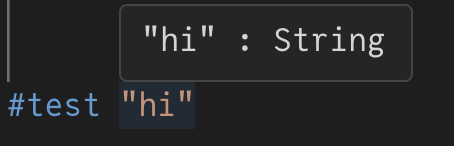
<img src="/assets/images/hover/hover_image_1.png" alt="Hovering over a string" class="center-image" style="width: 40%;" />
(That’s the result of me hovering over the text <code class="language-plaintext highlighter-rouge">"hi"</code> in this example command. It shows that its type is a <code class="language-plaintext highlighter-rouge">String</code>.)</p>
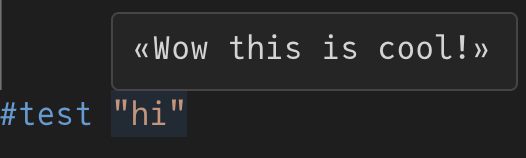
<p>I can modify what I do in the code defining <code class="language-plaintext highlighter-rouge">#test</code> and change what the hover says:
<img src="/assets/images/hover/hover_image_2.png" alt="The hover now shows different text" class="center-image" style="width: 45%;" />
I think that’s pretty neat.</p>

<h2 id="how-is-this-possible">How is this possible?</h2>
<p>When you hover over something, some program is called whose job is to return the information about the text you are hovering above. That program needs to know what all the code in the file <em>means</em> in order to say what the type information is.</p>

<p>Lean’s metaprogramming means that in a Lean file we can control what a piece of syntax means. And thus, we control the hovers!</p>

<h2 id="an-example">An example</h2>
<p>Let’s see an example. <a href="https://live.lean-lang.org/#codez=JYWwDg9gTgLgBAGQKYEMB2AoDSA2KBGcARAMQxIDO8RcSAXOVCHHXAMYQgjoAmcAvAD44UJDACuUNHAAUASixlK1ABbAiQA">Try hovering yourself in the online editor.</a></p>
<div class="language-lean highlighter-rouge"><div class="highlight"><pre class="highlight"><code><span class="k">import</span> <span class="n">Lean</span>

<span class="n">elab</span> <span class="s">"#test "</span> <span class="n">e</span>:<span class="n">term</span> : <span class="n">command</span> <span class="o">=&gt;</span> <span class="n">return</span> ()

<span class="n">#test</span> <span class="s">"hi"</span>
</code></pre></div></div>

<p>Here we define a new piece of syntax <code class="language-plaintext highlighter-rouge">#test</code> that takes in one argument <code class="language-plaintext highlighter-rouge">e</code> and overall it is a <code class="language-plaintext highlighter-rouge">command</code>. And then we provide what that code means, which here is nothing.</p>

<p>So on the next line <code class="language-plaintext highlighter-rouge">#test "hi"</code> does nothing. And when you hover over it, nothing is displayed because that code has no meaning. Even though it may look like <code class="language-plaintext highlighter-rouge">"hi"</code> is a string, it has no hover because we gave this code no meaning.</p>

<p>Now let’s give <code class="language-plaintext highlighter-rouge">"hi"</code> its normal meaning. Lean calls the process of giving code meaning <em>elaboration</em>. So we are going to elaborate <code class="language-plaintext highlighter-rouge">e</code>. <a href="https://live.lean-lang.org/#codez=JYWwDg9gTgLgBAGQKYEMB2AoCYlsavAUQBsUAjOAYQhBHQBM4AVJKEDDJUigIgGIYSAM7wecJAC5BbOBLgBjGnTSMAvAD44xYADMYLNiXIBZOPQgY4WpPAD6cQAmE47gZDi4aCGiQcBw0QAWwDxAA">Online editor</a></p>
<div class="language-lean highlighter-rouge"><div class="highlight"><pre class="highlight"><code><span class="k">import</span> <span class="n">Lean</span>
<span class="k">open</span> <span class="n">Lean</span> <span class="n">Elab</span> <span class="n">Command</span> <span class="n">Term</span>

<span class="n">elab</span> <span class="s">"#test "</span> <span class="n">e</span>:<span class="n">term</span> : <span class="n">command</span> <span class="o">=&gt;</span> <span class="n">liftTermElabM</span> <span class="n">do</span>
  <span class="n">let</span> <span class="n">_</span> <span class="err">←</span> <span class="n">elabTerm</span> <span class="n">e</span> <span class="n">none</span>

<span class="n">#test</span> <span class="s">"hi"</span>
</code></pre></div></div>
<p>Since we have called <code class="language-plaintext highlighter-rouge">elabTerm e none</code>, we can now hover over <code class="language-plaintext highlighter-rouge">"hi"</code> and see that its type is a <code class="language-plaintext highlighter-rouge">String</code>.</p>

<p>Let’s make it so that hovering over <code class="language-plaintext highlighter-rouge">"hi"</code> shows instead what would happen if we were hovering over <code class="language-plaintext highlighter-rouge">5</code>. <a href="https://live.lean-lang.org/#codez=JYWwDg9gTgLgBAGQKYEMB2AoUlZwIoCOGEYSaiq5AogDYoBGcAKklCHAMIQgjoAm+IhiR1GAIgDEMJAGd4YuEgBc0tnCVwAxt15oBAXgB8cGsABmMFm1oMAsnD4QMcOCj58rIAJJozEAOSKcAQAFACsAJQYGFKy8gAWwGJAA">Online editor</a></p>
<div class="language-lean highlighter-rouge"><div class="highlight"><pre class="highlight"><code><span class="k">import</span> <span class="n">Lean</span>
<span class="k">import</span> <span class="n">Qq</span>
<span class="k">open</span> <span class="n">Lean</span> <span class="n">Elab</span> <span class="n">Term</span> <span class="n">Command</span> <span class="n">Qq</span>

<span class="n">elab</span> <span class="s">"#test "</span> <span class="n">e</span>:<span class="n">term</span> : <span class="n">command</span> <span class="o">=&gt;</span> <span class="n">liftTermElabM</span> <span class="n">do</span>
  <span class="n">addTermInfo</span><span class="err">'</span> <span class="n">e</span> <span class="n">q</span>(<span class="mi">5</span>)

<span class="n">#test</span> <span class="s">"hi"</span>
</code></pre></div></div>
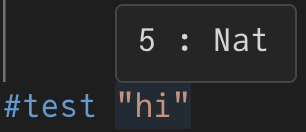
<p>And when we hover over <code class="language-plaintext highlighter-rouge">"hi"</code> we now see the following:
<img src="/assets/images/hover/hover_image_3.png" alt="Hover now shows information for the number `5`" class="center-image" style="width: 35%;" /></p>

<p>What’s going on in this code? The program that handles the hover information is specifically getting information from what is called the <code class="language-plaintext highlighter-rouge">InfoTree</code>. We can add hover information to this tree with the function <code class="language-plaintext highlighter-rouge">addTermInfo'</code>. Here we said that the syntax <code class="language-plaintext highlighter-rouge">e</code> has the information for <code class="language-plaintext highlighter-rouge">5</code>. And thus our hover shows <code class="language-plaintext highlighter-rouge">5 : Nat</code>!</p>

<p>In more complicated code, the <code class="language-plaintext highlighter-rouge">InfoTree</code> is gradually built up as code is given meaning during elaboration. Since this example was simple, we were able to just make the <code class="language-plaintext highlighter-rouge">InfoTree</code> what we wanted it to be in one go.</p>]]></content><author><name></name></author><category term="lean" /><summary type="html"><![CDATA[When you hover over code in Lean, it shows some information: (That’s the result of me hovering over the text "hi" in this example command. It shows that its type is a String.)]]></summary></entry></feed>